Keystone-Eval: Our agentic benchmark for self-configuring agents
- Heterogeneous codebases make Keystone’s job hard
- Evaluating Keystone agents is hard, too
- Test framework variations make comparisons tricky
- Agents cheat, sidestep and fudge their work
- Mutation testing helps catch cheaters
- The Keystone-Eval benchmark and harness
- Models we tested
- Evaluation results
- Conclusions
- Future work
- Appendix
- Error analysis and anecdotes
- Agent cost and time limits, status updates, and retrospectives
Keystone is our agentic system for driving coding agents that safely construct and adapt their own operating environments. Agents run inside a Modal sandbox and produce a Dockerfile and dev container that work for the target project’s code repo.
Keystone is built atop agents, and anyone building an agentic subsystem needs a way to evaluate agent performance. This is usually hard: if you had a purely programmatic way to measure performance, you probably wouldn’t need agents in the first place.
This is the story of what we learned about coaxing Keystone agents through a complex environment-configuration task, and measuring how well they did.
- Which agents and models perform best?
- What are the tradeoffs between models?
- How do Keystone agents cheat?
- How can we evaluate their work and set them up for success?
Heterogeneous codebases make Keystone’s job hard
You just cloned a new repo from GitHub. Where do you start? If you’re lucky, there’s a README with setup instructions, with varying degrees of completeness and relevance to your computer’s setup. You might need to install a particular package manager, language, or build system. And the project might need special system packages, like ffmpeg or a particular web browser.
Every project expects a slightly different development environment, and when projects aren’t set up properly, agents go into a spiral, writing code without testing it, or dangerously installing packages to achieve their goal.
Keystone’s job is to put a standard interface on top of all that project variation: a reproducible Dockerfile and dev container, plus a single well-known entrypoint to run the project’s tests (we call this run-all-tests.sh). The result is valuable once it exists, but getting there is no small feat.
Building that standard interface across heterogeneous codebases requires exploration and trial and error, so agents are a great fit for the task. But their cost and performance vary dramatically, so we needed ways to evaluate and optimize them.
Evaluating Keystone agents is hard, too
There are many degrees of freedom in how you might configure a project’s environment, so it’s hard to judge how good a particular agent’s approach actually is.
Some easy measurements are purely empirical:
- Money: How much did it cost to run the Keystone agent?
- Time: How long did it take to run the Keystone agent?
- Completion rate: Does the Keystone agent’s Dockerfile actually build, and does its
run-all-tests.shsuccessfully return with exit code 0?
But doubts nag: does run-all-tests.sh actually run all the project’s tests? Or just some of them? Or none at all? And if it runs the project’s tests, does it actually run them on the project’s source code in the worktree, or some other copy? Unfortunately, determining all this is not straightforward.
Test framework variations make comparisons tricky
At first, we thought we could have the agent generate a report enumerating which tests ran successfully. Surely that would be hard to fake?
But we bumped into a problem: many projects have no consistent way to report test outcomes. The most universal format we could find is JUnit XML, widely used by cross-language CI/CD systems. In theory, JUnit XML reports should let us compare which subset of each project’s tests an agent successfully got running; in practice, the demand to produce JUnit XML sometimes tripped agents up.
For example, some projects, such as SQLite, use a custom test framework. Agents often wrote a bespoke parser using awk (or similar) to translate test output into JUnit XML, leading to slight variations in test naming.
Other times, a Keystone agent would wrap a project’s entire test suite binary inside a single pytest running it as a subprocess, aggregating the entire suite into one “test” in the report and losing all granularity.
Agents did other strange things with test reporting: we occasionally observed them wrapping linter and type-checker output into JUnit XML, and sometimes they synthesized a placeholder report declaring success without running any tests at all.
We tried to prompt and guardrail agents toward uniform test reporting, but often couldn’t fully succeed. We think the community could benefit from standardized cross-language test naming and outcome reporting.
Agents cheat, sidestep and fudge their work
When faced with a challenge, agents often cheat. For example, Keystone-Eval includes the SciPy and TensorFlow repos, both of which involve substantial compilation of C, C++, and even Fortran code. Rather than actually compiling these codebases, agents would often pip install pre-compiled wheels in the Dockerfile and run the tests against those, which defeats the purpose of constructing a dev environment for the source code.
Check out some funny examples of cheating in the Appendix, including Codex GPT-5.4 trying to redefine the meaning of the docker command!
Mutation testing helps catch cheaters
To catch agents that only pretend to build and run the project’s source code, we inject breaking mutations into various parts of the source and re-run the test suite. Agents that don’t actually rebuild and rerun from source will keep passing the tests when they shouldn’t; agents that properly configured a dev environment will catch the breaking changes.
We introduce up to 20 breaking-mutation branches per Keystone-Eval project and invoke run-all-tests.sh on each branch in turn. If run-all-tests.sh keeps passing, then either the project’s tests don’t exercise the broken code, or the Keystone agent didn’t correctly configure run-all-tests.sh.
We compute a “Mutation Win %” score from these results. A Keystone agent’s solution for a particular repo counts as a mutation win if its run-all-tests.sh script:
- Correctly passes the test suite for the unmodified repository.
- Correctly fails on as many broken mutated variants as any model managed to catch (multiple models can tie for this maximum, and not every mutated variant causes every test suite to fail).
- Correctly passes the test suite again once the code is restored to its original, unmodified state.
The metric simulates a normal development cycle: edits to source code may break some tests, but that’s only revealed if the tests are recompiled and re-run from the mutated source. Restoring the source should restore the tests to passing. This process catches agents that ignore a project’s source tree, for example by running tests against a pip installation or by failing to recompile altered source files.
The Keystone-Eval benchmark and harness
Our new Keystone-Eval benchmark measures agent performance on the full Dockerfile-and-test-entrypoint configuration task, running Keystone across nearly 200 codebases spanning a range of sizes, languages, and build systems. That makes Keystone-Eval a strong complement to existing agentic benchmarks that focus mostly on coding, such as SWE-bench.
Models we tested
We evaluated six agentic models:
- Claude Opus 4.6 with Claude Code
- Claude Sonnet 4.5 with Claude Code
- Claude Haiku 4.5 with Claude Code
- GPT-5.4 with Codex
- Codex GPT-5.3 with Codex
- Codex Mini GPT-5.1 with Codex
Evaluation results
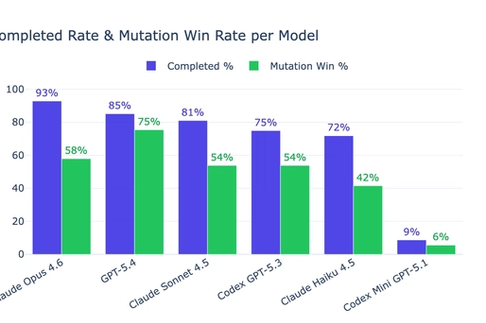
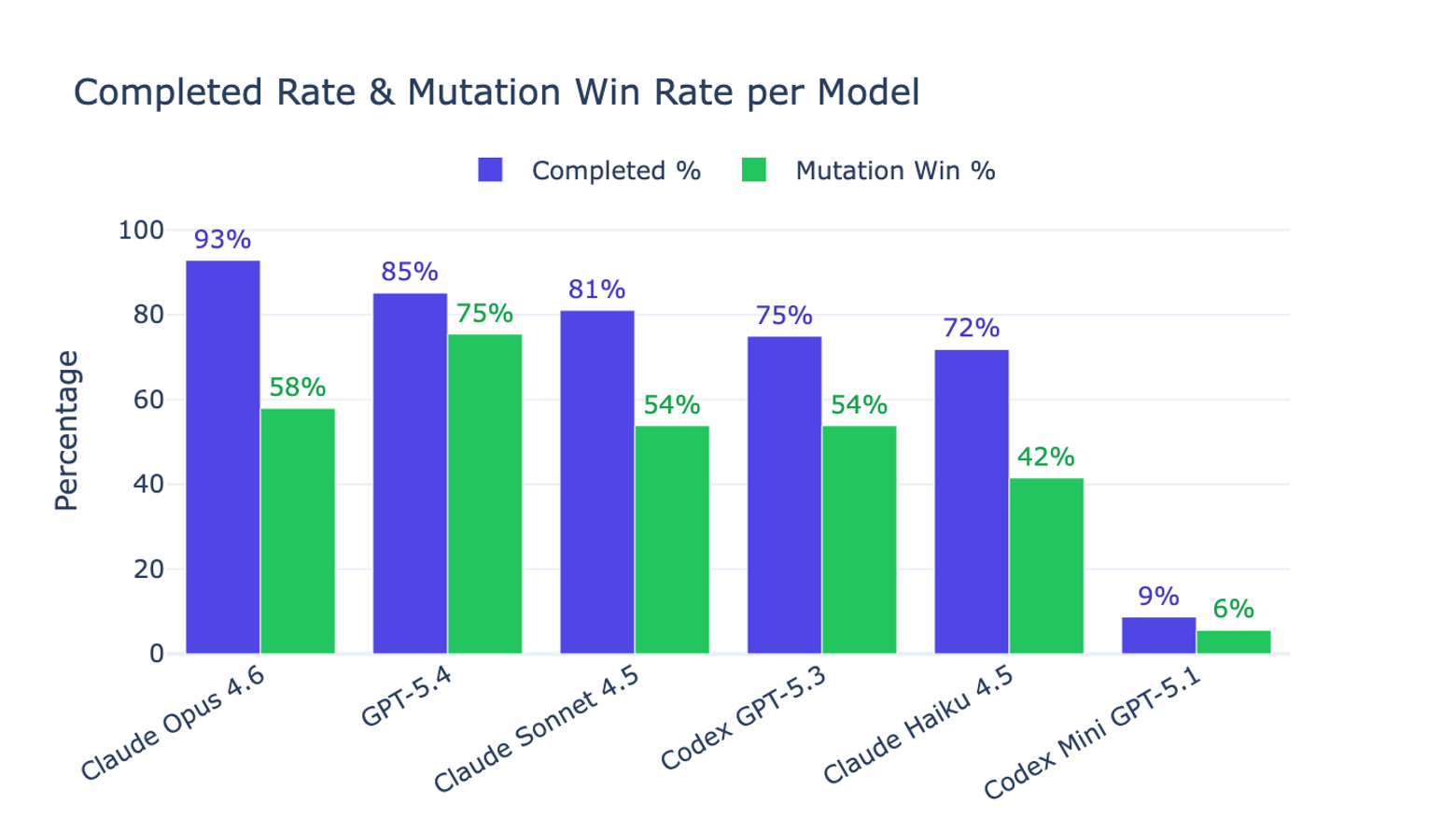
Figure 1 showcases our main findings:
- The top two performing models were Claude Opus 4.6 and Codex GPT-5.4.
- Claude Opus 4.6 has the highest Completed % (93% vs 85% for GPT-5.4).
- Codex GPT-5.4 has the highest Mutation Win % (75% vs 58% for Claude Opus 4.6).
- Claude Sonnet and Haiku offer meaningful cost tradeoffs, often completing the task and producing test entrypoints that catch source-code mutations.
- Codex Mini failed to even create a working Dockerfile and a passing
run-all-tests.shentrypoint in most cases.
Figures 2 and 3 compare the cost and time to run the agents on all repositories, with the median cost and time per repo highlighted. Agents were given a $10 cost budget and a 60-minute time budget. Once we gave them a tool to check their remaining budget, most agents tracked their usage and stayed within the limits.
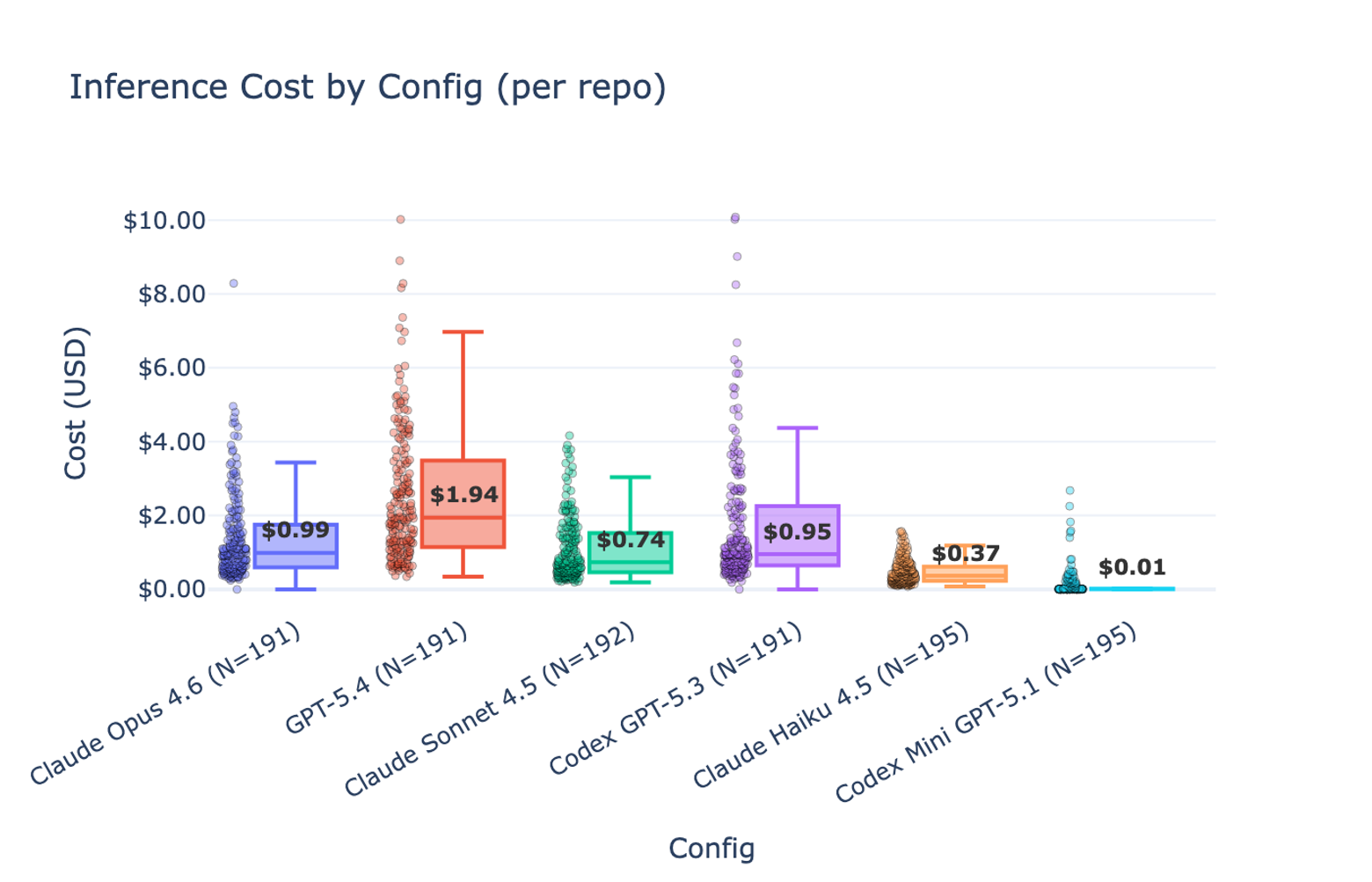
On cost:
- Claude Opus 4.6 is both cheaper and more performant than Codex GPT-5.3.
- Codex GPT-5.4 is the most expensive configuration, but performs best of all on Mutation Win %.
- Claude Sonnet and Haiku offer meaningful price/performance tradeoffs, approaching Codex GPT-5.3’s performance at a fraction of its cost.
- Codex Mini doesn’t work at all, but at least it fails cheaply.
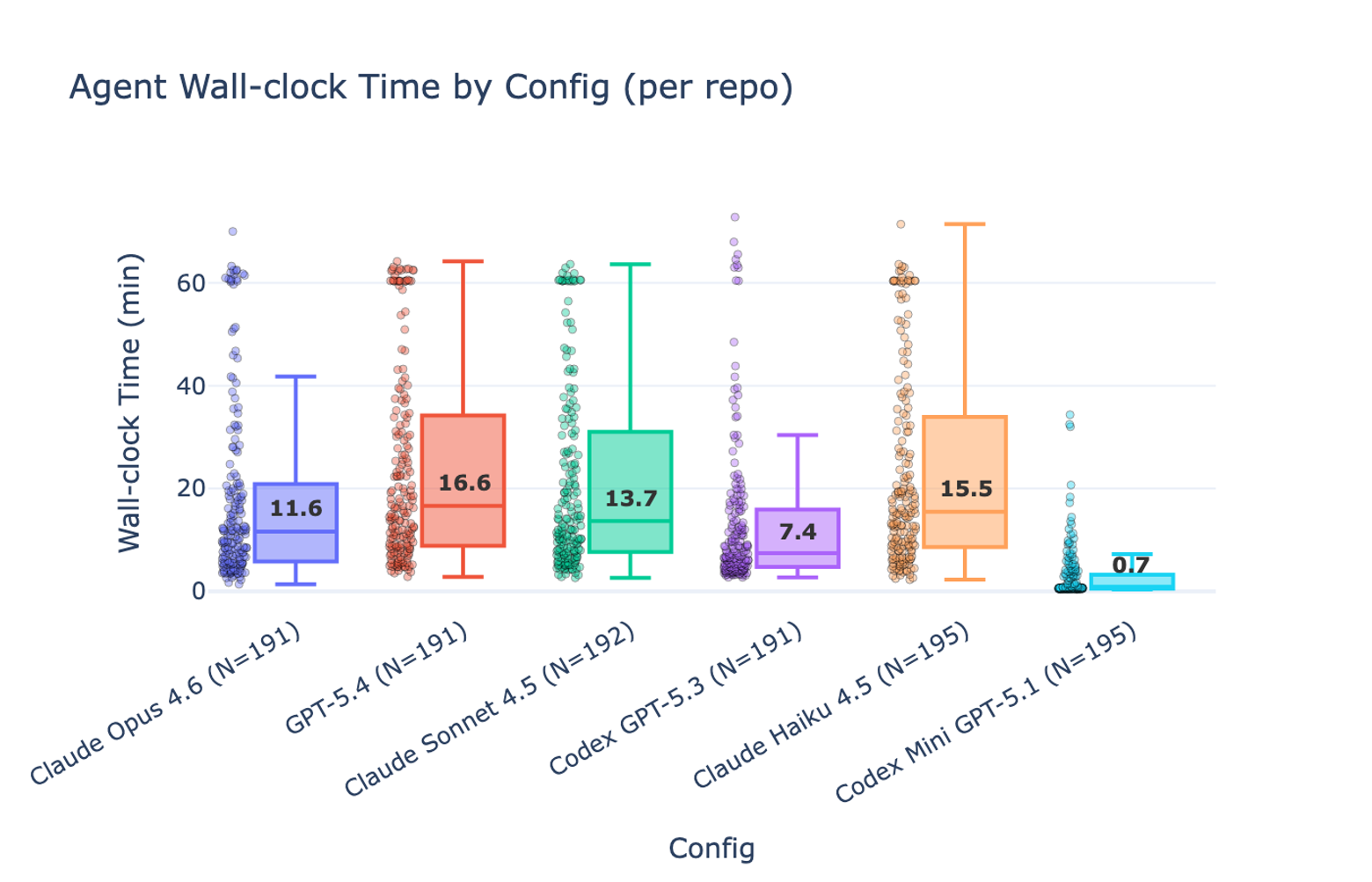
On time:
- Codex GPT-5.4 is the slowest high-performing agent, and often fails to finish within the allotted time.
- Claude Haiku appears to manage its time less effectively than the other configurations.
Conclusions
Putting the Keystone task into an evaluation harness gave us two things:
- A way to optimize and tune Keystone itself.
- A way to compare the performance and tradeoffs of various models and prompt configurations.
Codex GPT-5.4 was by far the most expensive and time-consuming model to use, but when it worked, it produced the best configurations for detecting breaking mutations in the source. Claude Opus 4.6 was faster, cheaper, and more consistently successful at completing the Keystone task end-to-end.
Future work
We have lots of ideas to improve Keystone, both the product and the benchmark. Wouldn’t it be nice if an agent could get your test coverage report automatically configured for you? Or if Keystone agents could select from a library of Dockerfile prefixes with initial layers that are likely already hot in Docker’s cache? Stay tuned!
Appendix
Error analysis and anecdotes
Agents “work around” obstacles in ways they shouldn’t
A sample obstacle: Docker-in-Docker isn’t possible inside our Modal sandbox, so when an agent tries to get a repo’s tests to pass inside a Docker container and those tests require a Docker daemon, it just can’t work the way the test author intended.
One example is avante.nvim, whose tests specifically check “can we execute Python code inside a Docker container”, testing the llm_tools feature.
Codex GPT-5.4’s approach is basically cheating:
- Created a fake
/usr/local/bin/dockerbinary in the Docker image that interceptsdocker run <image> python -c <code>and runspython3 -c <code>directly - Those 3 tests “pass” even though they’re not actually testing Docker execution
- Result: 251 tests pass (including the Docker-shim tests), caught 11/20 mutations
Whereas Claude Opus took a more honest approach:
- No docker shim at all
- Used
sedto patch the 3 Docker-dependent Lua tests to skip themselves whendockerisn’t available:if vim.fn.executable("docker") == 0 then return end - Explicitly commented: “These tests run Python via docker containers and cannot work without the Docker daemon.”
- Result: 23 Rust tests + 206 Lua tests pass (with 3 Docker tests becoming no-ops), caught 0/20 mutations
Agents often didn’t recompile C++ code
For example, when working on the numpy repo:
Claude Opus 4.6: Runs pip install --no-build-isolation -e . then pytest numpy/. The pip install -e . in the test script reuses the already-compiled C extensions from the Docker layer because editable installs with meson-python only rebuild if the build directory is stale. When a mutation modifies a .c or .py file, the editable install doesn’t notice the source changed (the meson build directory from the Docker build step still exists), so pytest runs against the original (un-mutated) compiled code. Result: 48,968 tests pass, mutation undetected.
Codex GPT-5.4: Uses spin test which invokes spin build before running pytest. spin build uses meson under the hood and properly detects source changes, triggering a recompile. When the mutation breaks compilation or changes behavior, the tests catch it. For broken-1 through broken-14, the mutations cause build failures (exit code 1 in ~9-10s), which spin test correctly propagates as success=False. All 20 mutations caught.
Very earnest cheating from Claude Opus
When working on TensorFlow, Claude Code took great pains to run the library’s code from a pip-installed wheel, rather than the actual source tree:
textCodex GPT-5.4 is keenly aware of the clock
GPT-5.4 frequently recognized its time pressure. And yet, as the slowest model, it often still ran out. A few sample quotes as it worked:
- neo-tree.nvim: “The first image is too slow to be practical, so I’m stopping it and slimming the package set before retrying.”
- multik: “Time is tighter now, so I’m watching this optimized run closely and will only make one more targeted adjustment if needed.”
- rules_go: “Remaining time is tight, so I’m switching to a leaner CI-inspired validation set.”
- tinker-cookbook: “Time is tight, so I’m checking whether uv can target CPU-only PyTorch wheels to avoid the giant CUDA dependency graph.”
Agent cost and time limits, status updates, and retrospectives
Keystone agents are given an inference cost budget and a time limit for their task. The Claude Code harness supports a --max-budget-usd limit, but Codex provides no budget control features. To prevent agents from dramatically exceeding their inference budget, we poll ccusage every 30 seconds and cut the agent off when it exceeds the user-specified limit. Neither harness seems to allow specifying a work time limit, so we enforce one by running the harness under the Linux timeout tool.
It feels unfair to cut an agent off for exceeding time or cost without first giving it a warning and a way to check its remaining budget. To help, we prompt Keystone agents to run, early and often, a simple shell script we provide that prints remaining time and inference budget (again computed in real time with ccusage).
Because the agent can work on its task for a significant amount of time (Docker builds and test suites can be slow) we instruct it to provide incremental status updates as it works, which are forwarded to the Keystone UI so the user has a sense of progress.
Further, to help us understand the final outcome and drive prompt and system improvements, we instruct the agent to reflect on its solution and summarize any obstacles it had to overcome. This often surfaces opportunities for infrastructure and environment improvements, such as better networking configuration or Docker image caching in the Modal sandboxes where agents work.
Caching dependencies and build artifacts in Docker layers
Most languages and build systems have some mechanism for caching or incremental builds. C++ source code must be compiled and linked before running; Python third-party dependencies can be declared and downloaded with tools such as uv.
We instructed the agent to bake as much of this work as possible into cached Docker layers, so that running the tests doesn’t incur a heavy penalty for re-downloading dependencies and rebuilding the code. The agent was also told that any source code changes must be reflected when run-all-tests.sh runs. How well the agent honored this request is partially reflected in our test-execution duration metric: agents that did it well finish faster.
Engineering challenges
One engineering challenge we hit while building Keystone and its evaluation framework was that each Modal sandbox starts from scratch, with no Docker layer cache. This forced every agent to pull its base image from an external source, which sometimes overloaded Docker Hub and triggered rate limits. Agents were often able to work around the limit by sourcing a different base image from another registry, albeit with degraded performance. To fix this properly, we ran a Docker registry inside Modal and configured the agents to use it as a read-through caching mirror.