Bouncer 2.0: Leveraging Local Compute to Detect AI Slop
We're excited to announce AI text and image detection in Bouncer! We've been seeing a lot of Bouncer users try to filter out AI content from their feeds by adding "AI slop", "AI video", or "AI written" as filter terms. This prompts an LLM in our backend to look at the text and images associated with a post and classify it as AI-generated or not.
However, there’s an issue with this approach: simply prompting an LLM to make this judgment is too inaccurate. For text, previous benchmarks have shown that zero-shot prompting methods like this are barely better than random, especially for smaller models. While filtering for "AI written" may catch some posts with telltale markers of AI writing (em-dashes, "it's not x, it's y", etc.), for the most part this method fails and is prone to false positives. Similarly, an LLM cannot reliably tell whether an image is AI-generated just by looking at it.
Reliable detection requires models trained specifically for the task. To address this, we've built dedicated AI detection models for both text and images. Simply go into Bouncer and click “Remove AI Slop” to start filtering.
With this feature, the following content can be detected and removed:

AI text detection
Training a detector starts with a dataset. We collected 28,000 human-written texts from Amazon reviews, Yelp reviews, Reddit, FineWeb-EDU, news articles, and Twitter. We then prompted Claude Sonnet 4.6, Gemini 3 Flash, and GPT 5.3 to edit those texts ("Make this more concise", "Make this sound more sophisticated", etc.), producing a set of AI-edited text. Finally, we prompted the same models to generate text from scratch based on each domain and topic ("Generate an Amazon review for a rice cooker"). The result is a dataset evenly split between human, AI-edited, and AI-generated text. We included AI-edited text as well since posts in the wild are not necessarily purely human or purely AI. A post might mix both, or paraphrase originally human text through an LLM, and our model needs to catch these cases too.
The architecture is relatively standard. To classify a post, we first pass its text through a fine-tuned LLM to get the hidden state of the last input token. This hidden state is a high dimensional vector that represents everything the model has learned about our input text. Typically it’s used to generate the next token, but in our case we feed it through a classification head that assigns the text a level of AI assistance.

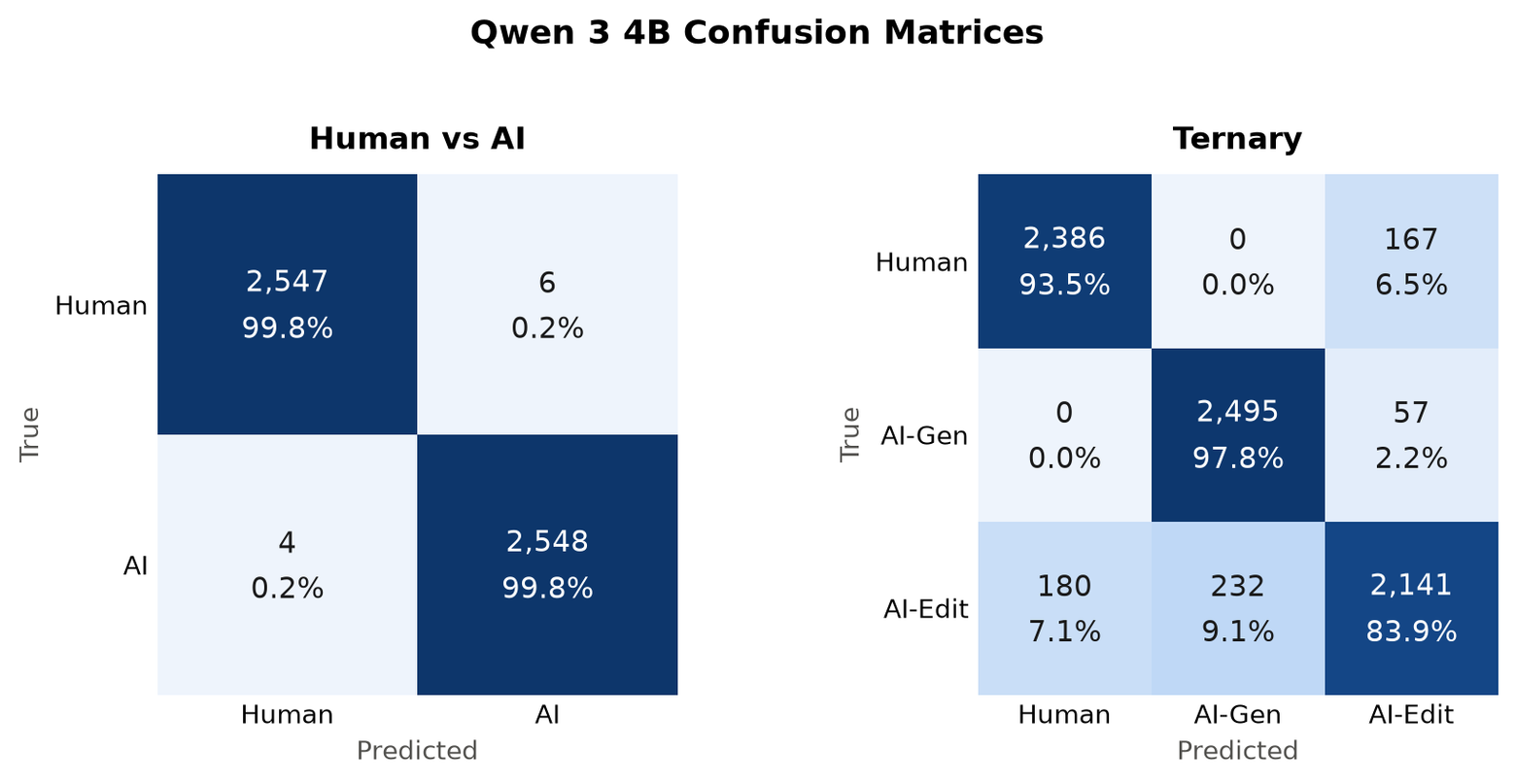
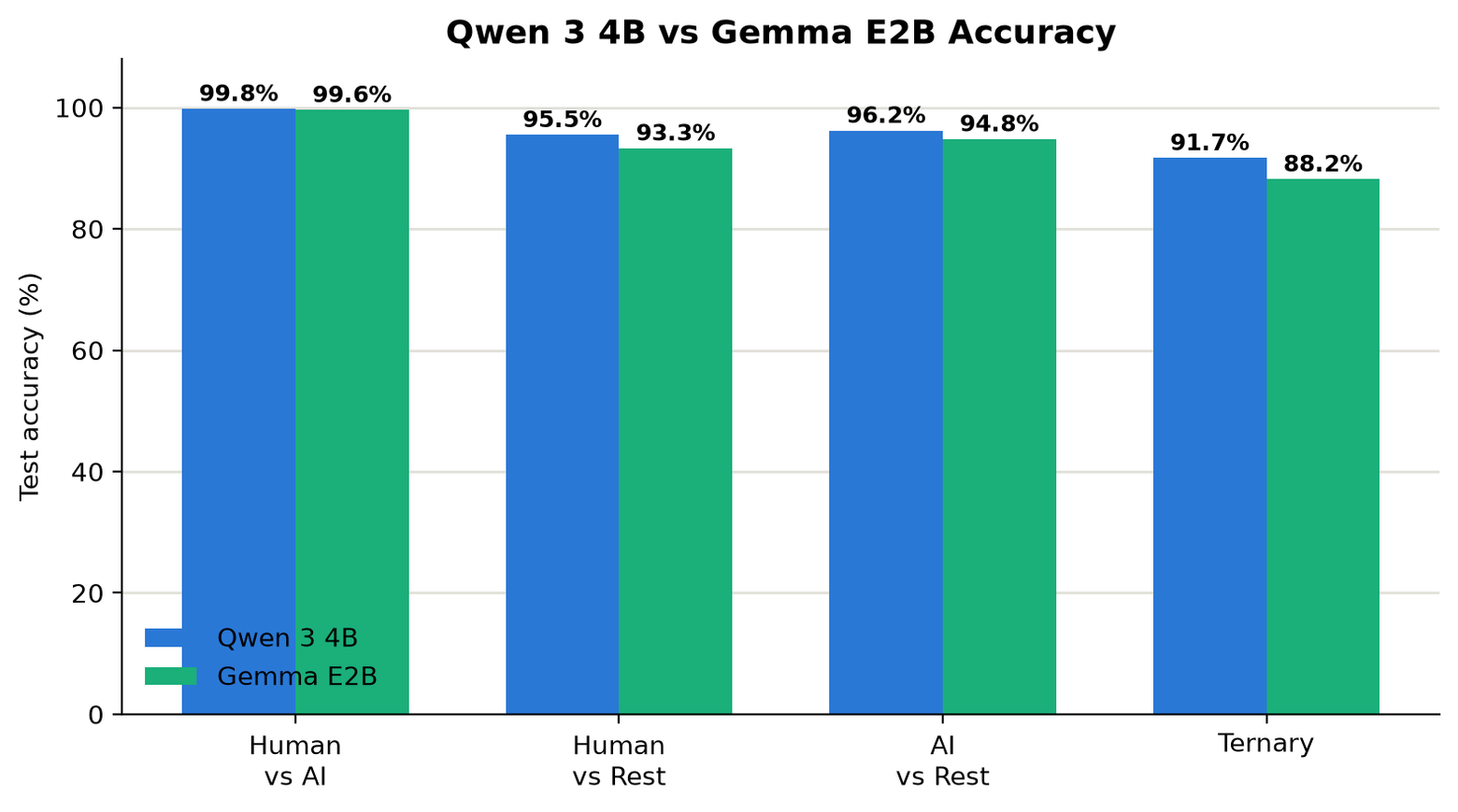
Using Qwen 3 4B as our LLM backbone we achieve 99.8% accuracy on our test set when discriminating between human and AI-generated text, and 91.7% accuracy when classifying text as human, AI-edited, or AI-generated. As expected, the majority of confusion occurs in the AI-edited case.
We also evaluated the detector on third party benchmarks. Despite training on none of the models represented in the RAID dataset, it achieves 96.4% accuracy with a false positive rate of 0.10%.
This model powers AI text detection on our servers. But we wanted to go further.
Making it local
At Imbue, we are committed to personal computing. Where possible, we want users to be able to run tasks on their own devices. This is why our iOS app offers AI text detection fully on device.
A 4B parameter backbone turned out to be enough for strong text detection. With 4-bit quantization, that sits right on the cusp of what the newest iOS devices can run given their memory constraints. But there's a complication: the iOS version of Bouncer already uses Gemma 4 E2B to classify posts by filter categories. Users can't reasonably download both Gemma 4 E2B and Qwen 3 4B to get normal filtering and AI text detection locally, and the two models wouldn't fit in memory simultaneously anyway. The solution is to share one LLM backbone across both tasks.
To support both tasks, we conditionally apply a LoRA adapter to Gemma 4 E2B. The normal text generation flow runs the base model without the adapter. The AI detection flow applies the adapter, takes the last token's hidden state, and passes it through a small classification head. The LoRA adapter is just 10MB which makes it quick to download and light on memory.
To implement this, we had to make some changes to the LiteRT-LM runtime and LiteRT-Torch, which exports models to the format required by the runtime. One of the issues we ran into is that LiteRT-Torch did not support exporting to the mobile optimized wNa8o8 schema. This is the schema that Google’s prebuilt model for iOS uses in order to reduce its memory footprint. In order to expose hidden states as output, a new export of the model is required. By adding this new schema in our fork, we are able to produce a model with bit identical weights to Google’s prebuilt, preserving model output quality for the normal text generation path.
After implementing this, we added functionality to the LiteRT-LM runtime to support the application of LoRA adapters, constrained decoding, and prefix caching. The resulting on-device model achieves 99.6% accuracy on our test set when discriminating between AI and human text, and 88.2% when discriminating between human, AI-edited, and AI-generated text.
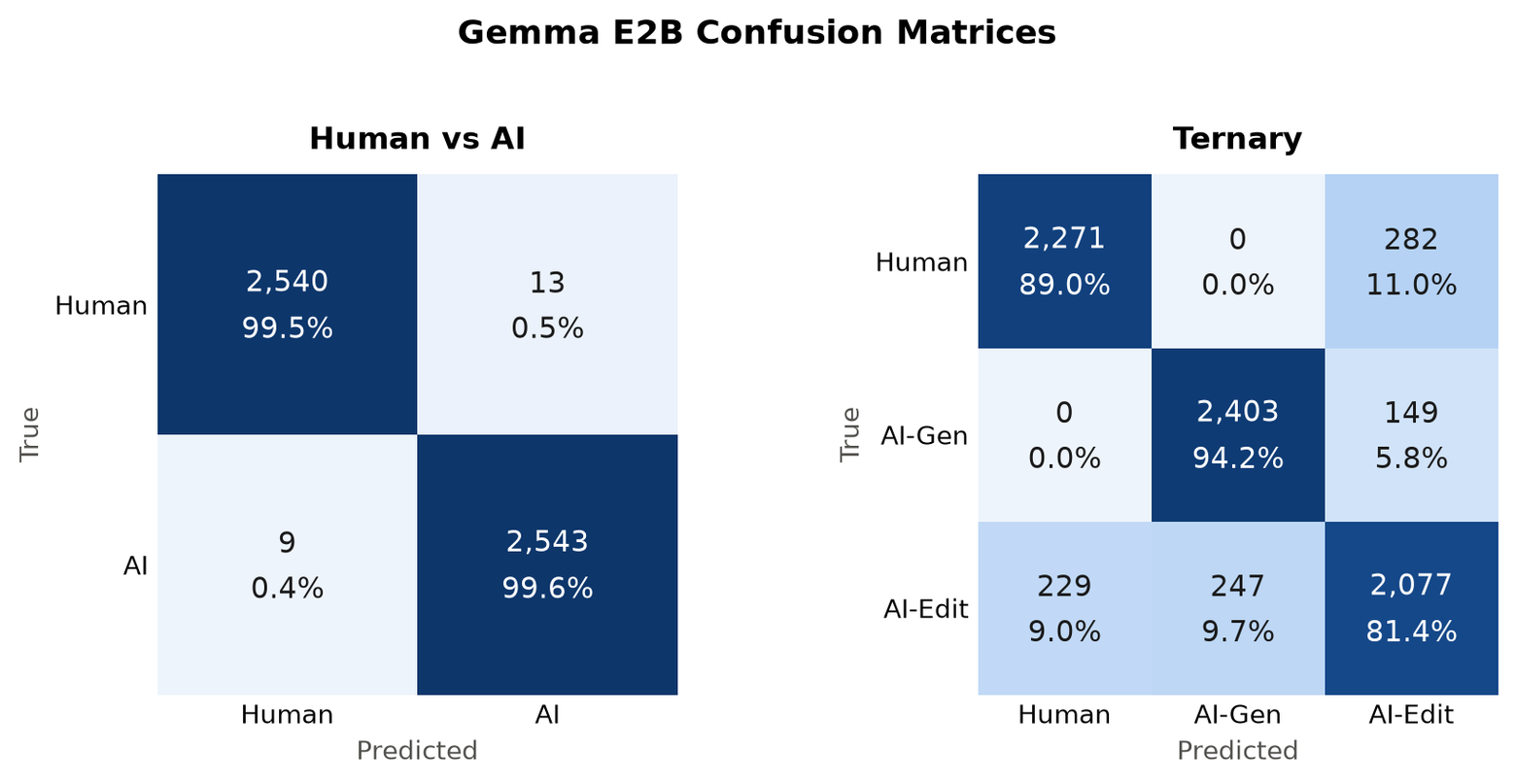
The accuracy of this model is slightly worse than the hosted version due to its smaller LLM backbone, but this is an acceptable tradeoff for running fully on device.
Local AI text detection is also fast, since classification requires only a single forward pass with no autoregressive decoding. The average text detection request for a tweet takes just 120 milliseconds on an iPhone 18.
The training code and evals for both the server and on-device models are open source here. We also provide the model export flow for those wanting to run their own models on iOS devices.
What about images?
Image detection is built in a very similar way. Our model is a fine-tuned DINOv3 backbone with a classification head, derived from top-performing solutions in NTIRE's 2026 AI image detection challenge. The training data is generated from a variety of AI image models, and we apply many different augmentations to improve robustness to cropping, blurring, compression, and other transformations that images commonly undergo online. We use the 7 billion parameter version of DINOv3, which is too large for consumer devices to handle well so image detection runs server-side only for now. In the future we may pursue training with a smaller ViT backbone in order to bring this feature to users locally.
Both features are available in Bouncer today which is available on the following platforms: