A managed agent to configure Dockerfiles for any repo
Keystone is an open source agentic tool that automatically generates a working .devcontainer/ configuration for any git code repository. We built it because we kept running into the same problem: what's the shortest path to make this arbitrary code actually run?
Given a source repo, Keystone analyzes the project structure and creates:
devcontainer/devcontainer.json
VS Code dev container configuration
devcontainer/Dockerfile
Container image definition
devcontainer/run_all_tests.sh
Test runner script with artifact collection
Keystone builds on the existing dev container standard, which is also supported by VS Code and GitHub Codespaces.
Features
Any repo, any stack
Python, Rust, Elixir, Flutter, polyglot, legacy. Keystone figures it out.
Sandboxed by default
The agent runs inside a Modal container with its own Docker daemon. Your machine is never touched.
Three files, ready to commit
Dockerfile, devcontainer.json, and a test runner that actually passes. Check them in and move on.
Built on the dev container standard
Plays cleanly with VS Code and GitHub Codespaces from day one.
Bring your own agent
Works with Claude Code or OpenAI Codex out of the box.
One command to start
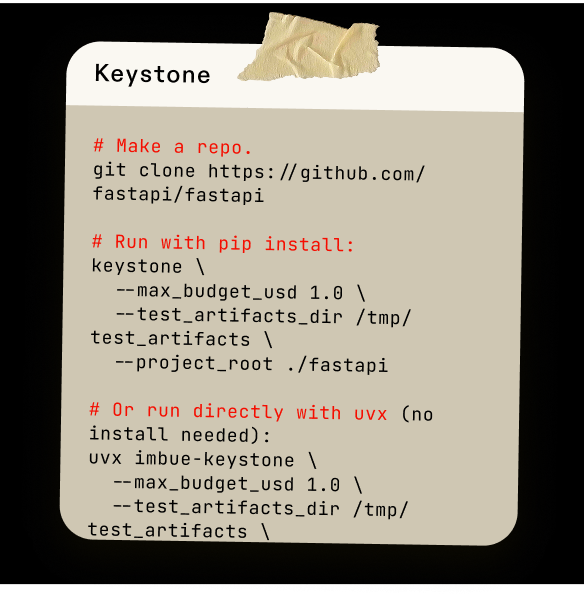
pip install kystn, point it at a repo, walk away.
Built by people who care, for people who build

Every developer has had this moment. You clone a repo. You want to run it. Nothing tells you how.
At Imbue we kept hitting that wall. The question is simple: what's the shortest path to make this arbitrary code actually run?
The obvious move was to point a coding agent at it. The trouble is, when agents step into sysadmin territory, they make dangerous decisions. We've watched them downgrade packages, modify files in our home directories, reach for kernel parameters. Containerization matters most when your agent is acting like a sysadmin.
We want coding agents that work for everyone, on every project. Keystone is one step in that direction.
Frequently asked questions
What does Keystone actually do?
You point it at a git repo. It hands back a working .devcontainer/ directory with a Dockerfile, a devcontainer.json, and a run_all_tests.sh that gets the project's tests passing.
Why not just ask Claude Code to do this directly?
Configuring a container needs full access to your Docker daemon. We've watched agents in that mode clear Docker config, change kernel settings, and downgrade packages on the host. Keystone contains all of that inside a Modal sandbox.
What do I need to run it?
A Modal account and an ANTHROPIC_API_KEY. Install with pip install kystn or run it without installing via uvx kystn.
How much does a run cost?
The default budget is $1.00 USD of inference per run. Median cost on Claude Opus 4.6 across our 191-repo eval set was $0.99. You can raise or lower the cap with --max_budget_usd.
Does it work on big or complex projects?
Yes. We've run it on FastAPI, Flask, Requests, Starlette, SciPy, PyTorch, and TensorFlow (873 tests passing). Polyglot repos work too, including a Rust + Flutter project with 12 tests across both stacks.
Is it open source?
Yes. Source and evaluation harness live at github.com/imbue-ai/keystone. PRs and bug reports welcome.