
In the past, the bottleneck of software development was the speed at which code could be produced. Now it takes longer to test code than it does to write it; we’re shifting to address the new bottleneck.
Two weeks ago we announced Offload, a remote-first parallel test runner built to solve this new problem. Today, we’re taking an in-depth tour of how it works.
What is Offload? Who’s it for?
Let’s get started by outlining what Offload actually is.
Offload is a generic tool that distributes your test suite to an army of remote sandboxes that live in the cloud. This has the goal of shrinking test runtime such that end-to-end testing fits comfortably into the agentic coding loop. Offload is generic over two main parameters:
- The framework used to run your tests.
- The remote infrastructure your tests are sent to for execution.
To put it a little more formally, Offload is for large agentically engineered projects running large CPU-bottlenecked test suites. Offload is particularly great when your tests need isolation or contend for access to system resources. These are cases where the speedup you’ll get from local alternatives to Offload are notably underwhelming.
Before we continue, there are some constraints we should highlight.
Platform Requirements
Offload is exclusively for Linux or MacOS with bash installed.
We also expect your project to produce the same set of tests regardless of the environment it runs in. Because discovery runs locally, this could cause a test-set mismatch later when we run your test suite in a different environment. Our current approach is to detect this mismatch and surface the failure to the user! In the future, we plan to support discovery in sandboxes to eliminate this requirement.
Now that you have a high-level sense of what Offload does, let’s go into a little more detail on how it works. We’ll go step-by-step through a single Offload invocation.
Stepping Through Offload
1. Discovery
Test discovery calls your framework locally to aggregate a list of test IDs.
Whichever test framework you happen to be using, a subprocess is launched using your framework’s test collection command.
Framework Customization
Offload currently comes with first-class support for pytest, cargo-nextest, and vitest. That being said, you can also plug in your own custom framework like this one, which uses bash scripts to discover and run tests. Offload has a few placeholders that you can use to build templates for commands like the ones shown here (more in the docs about this!).
[framework]type = "default"discover_command = "./scripts/discover_tests.sh {filters}"run_command = "./scripts/run_tests.sh {result_file} {tests}"result_file = "/tmp/results.xml"test_id_format = "{classname}::{name}"
Check out our README if you’d like to implement your own. You can also have an agent do it for you! (In our experience, Claude Code with Opus 4.6 always one-shots this)
Framework Requirements
Since Offload is entirely framework-agnostic, we require the testing framework to expose a certain interface. Namely, we want the framework to expose a list of test IDs like this
foo::browser_opensfoo::button_clicksbar::timeout_works
So we can run commands on a remote sandbox that look something like this
<your test framework (pytest,vitest,cargo-nextest)> run foo::browser_opens
That is to say, if you have two tests with the same ID this isn’t going to work. Many frameworks don’t allow this (which is great!), but some (like Vitest and Jest) have workflows that encourage duplicate test IDs. This is where we got experimental with agentic coding.
Our onboarding skill instructs agents to fix the test ID duplicate issue manually by renaming tests. We make sure to surface this to the user because letting an agent mutate your codebase to change test names is pretty invasive. That being said, if you already take advantage of agents to engineer actual features in your project, this task is relatively small and low-risk. This is also good for code quality in general, since test IDs are now forced to contain the specific parameters being tested.
2. Image preparation and Sandbox Creation
What are Sandboxes?
Sandboxes are ephemeral, isolated cloud environments powered by Modal. Instead of taxing your local CPU, Offload mirrors your project state into these remote containers to execute tests in parallel.
The fact that tests are discovered locally allows us to spin up sandboxes in the cloud while your testing framework churns locally to discover tests. Since we currently require projects to be cross-platform to use offload, we can expect that every test discovered locally can be run in a sandbox.
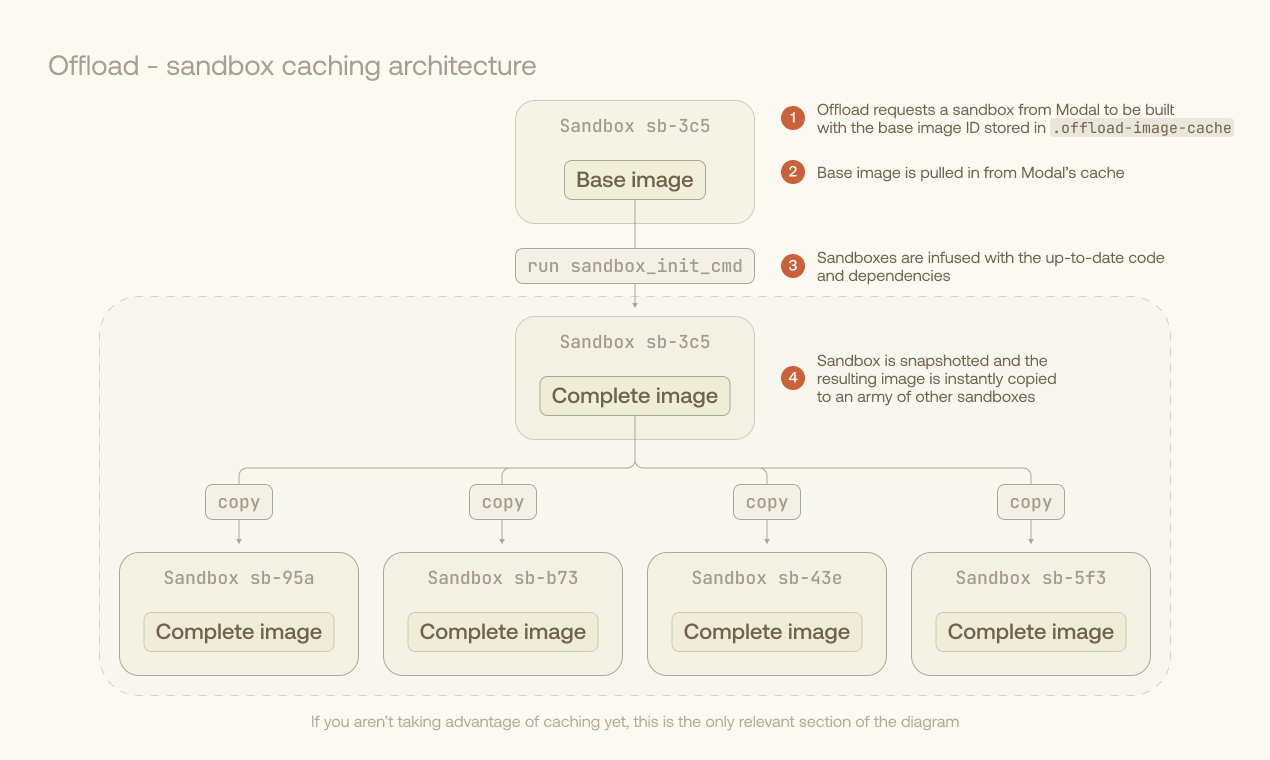
Your Sandbox image is prepared remotely. If you’ve used Offload before, you likely have a cached image on Modal. A temporary sandbox is created for a setup command, then snapshotted so it can be cloned. This setup command can be used to apply a small diff on top of a previously used image, leading to massive savings in image build overhead. Here’s an example of a bash script taking full advantage of this workflow, leading to minimal setup time.
# Reads a predetermined git commit SHA for which an image exists on Modal alreadyBASE_COMMIT=$(cat .offload-base-commit)# Makes a temporary directory to hold the diff between current state and base commitmkdir -p /tmp/offload-upload# Writes the diff to a temp file in the directory./scripts/generate_patch_for_offload.sh $BASE_COMMIT > /tmp/offload-upload/patch# Runs offload with the patch copied in on image setup# The sandbox_init_cmd in offload.toml can now apply the patch on setupoffload run {{args}} --copy-dir="/tmp/offload-upload:/offload-upload"
We’re planning to bootstrap this entire workflow with a single line in offload.toml in an upcoming release.
The image from the prepared sandbox is now infused with all necessary test code and dependencies. Modal makes it easy to instantly spin up hundreds of sandboxes from the fully-prepared image.
3. Test execution
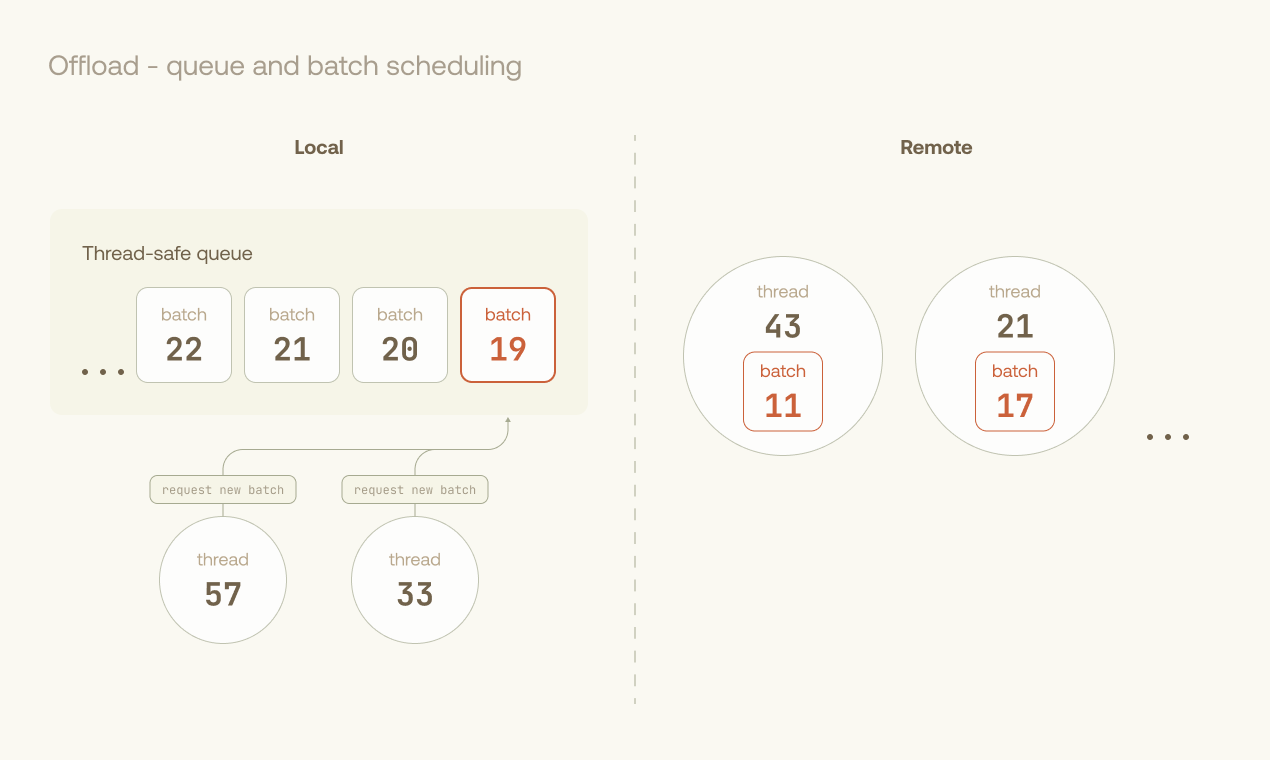
Offload’s orchestrator pulls cached times from previous runs to optimally assign tests. Sandboxes are dynamically fed batches of tests through a queue until all are executed. After each batch, a report is downloaded along with user-specified test artifacts.
Batch Scheduling
We currently use LPT scheduling to load-balance across our pool of executors, and are looking into further optimizations such as work-stealing. We batch tests into groups to minimize the upfront penalties of I/O and test harness runs.
Pretries and Flaky Tests
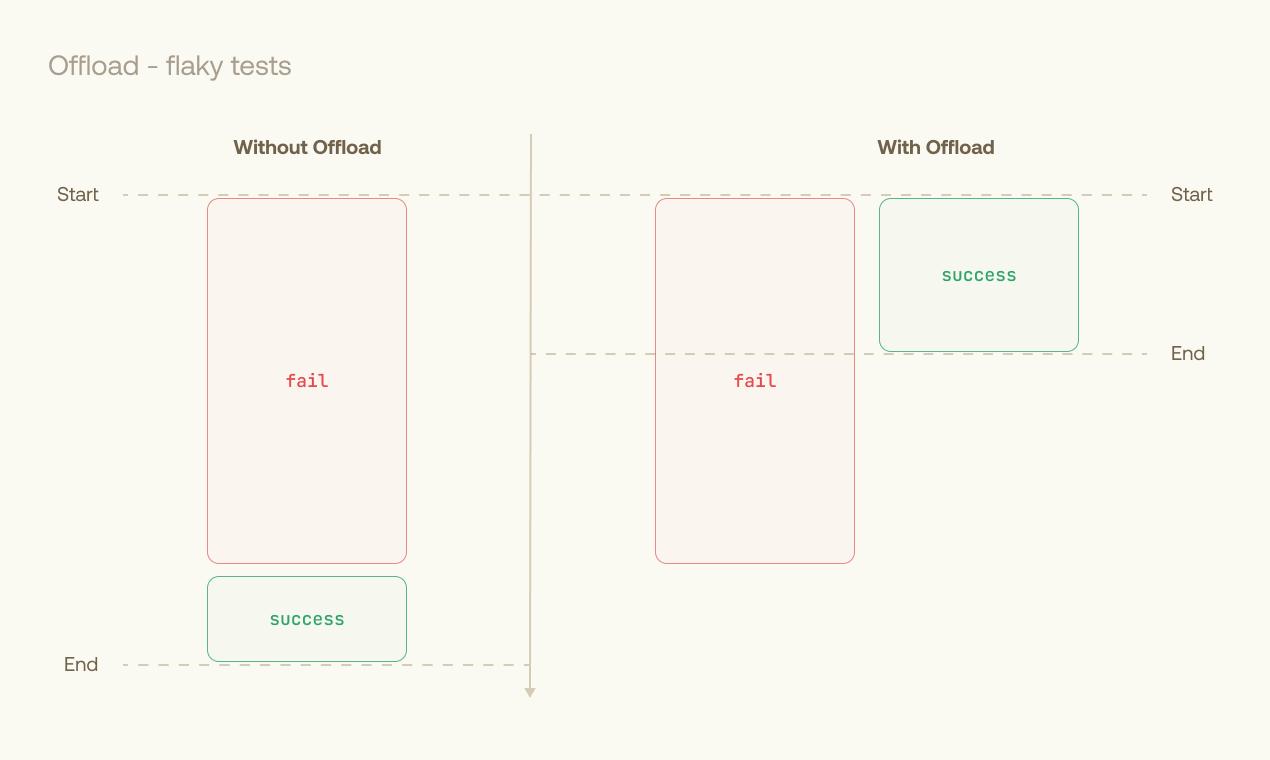
We run multiple instances of each flaky test in parallel on different sandboxes. This minimizes the time penalty for retries, allowing us to terminate as soon as each flaky test has passed once. This approach becomes especially useful in browser-based or network-heavy testing, where failures are often timeouts.
This workload is naturally asynchronous and multithreaded, making Rust’s tokio crate an ergonomic choice for orchestrating the execution phase.
4. Reporting and Artifacts
Results from each batch are merged into a single junit.xml report for your agents to churn through. The junit.xml is used as the single source of truth for all reporting functionality within Offload. By default, logs from the remote machines are collected in same directory as the JUnit XML report. You can optionally download artifacts from the sandboxes by configuring download_globs in your offload.toml file.
If you want just the logs of failed tests, we built the offload logs command so you (or your agent) can read one pretty-printed log of all failures across your test suite.
Get Involved
Now that you’ve stepped through some of Offload’s inner machinery, you might want to help us improve it. If you do, we have some options for you.
Write your own Offload plugin
To give you some more detail on how Offload’s interface is generic and pluggable, let’s look at the Rust traits Offload exposes.
If you’d like to see your testing framework supported as a first-class citizen in Offload, you can implement this trait for a Rust Type of your creation.
pub trait TestFramework {/// Discovers tests in the given paths.////// This method typically runs a framework-specific discovery command/// (e.g., `pytest --collect-only`, `cargo test --list`) and parses/// the output to extract test records.////// # Arguments////// * `paths` - Directories or files to search for tests. If empty,/// uses framework-default paths from configuration./// * `filters` - Optional filter expression to narrow down test discovery./// The interpretation of this filter is framework-specific (e.g., test/// name patterns, marker expressions)./// * `group` - Group name to assign to each discovered test record.////// # Returns////// A list of discovered [`TestRecord`] objects, or an error if discovery/// failed (command error, parse error, etc.).async fn discover(&self,paths: &[PathBuf],filters: &str,group: &str,) -> FrameworkResult<Vec<TestRecord>>;/// Generates a command to run the specified tests.////// The returned [`Command`] should:/// - Run only the specified tests (not all tests)/// - Produce structured output (e.g., JUnit XML) for result collection/// - Generate a result file if the framework supports it////// # Arguments////// * `tests` - Tests to execute (borrowed from TestRecords)fn produce_test_execution_command(&self,tests: &[TestInstance],result_path: &str,fail_fast: bool,) -> Command;}
Similarly, if you have an alternative sandbox provider that you’d like to have first-class support, you can implement our SandboxProvider and Sandbox traits.
If you choose to do one of these, feel free to raise a PR on our repo.
Join the party on Github
Aside from these types of changes, we also welcome comments, suggestions, complaints, and issues. We’re looking forward to seeing you on Offload’s Github Repo!