A case study in testing with 100+ of Claude agents in parallel
In our previous blog post, we introduced mngr and how you can use it to usefully launch hundreds of parallel agents. Here’s all the details of how we are actually using mngr to run and improve itself, by testing its own demo script.
High-level architecture
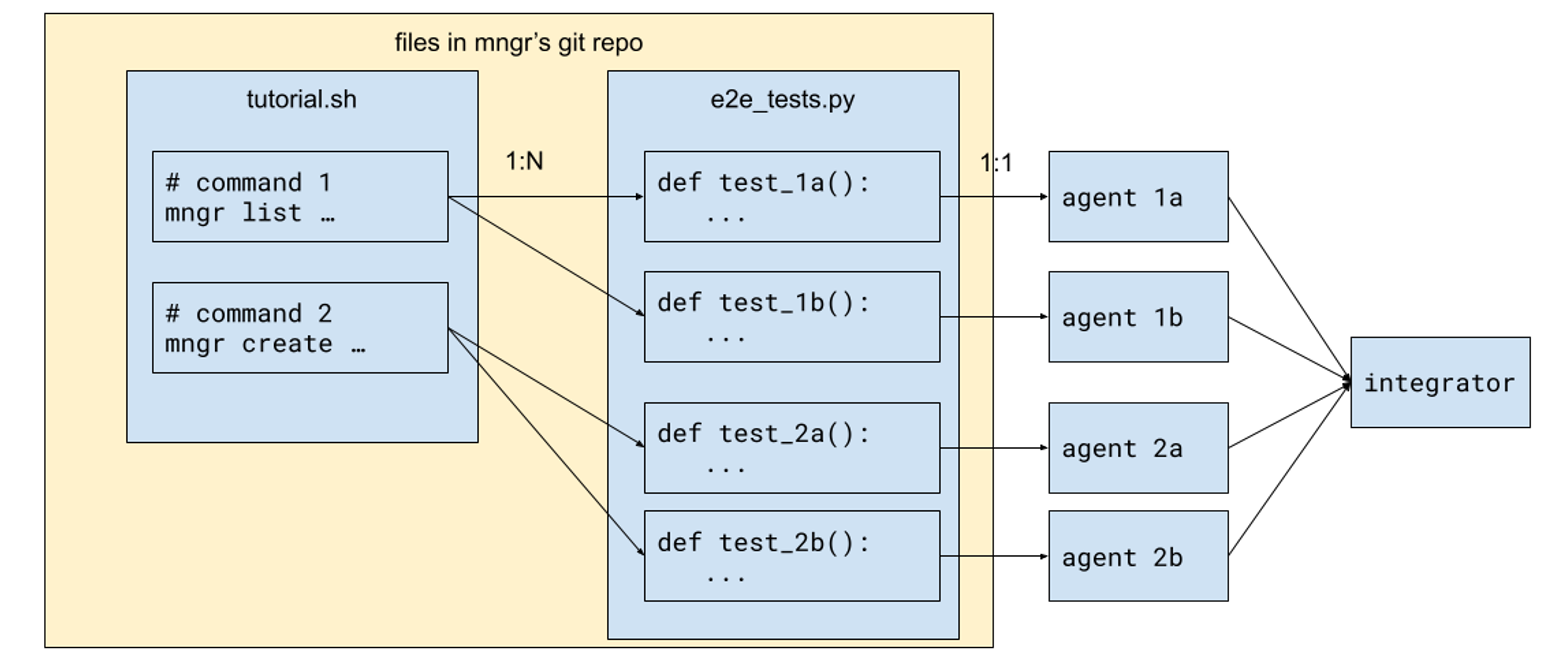
This is how the entire setup works:
- We start from a tutorial script,
tutorial.sh, containing blocks of commands. A block is simply a sequence of consecutive non-empty lines. - For each block, we derive one or more pytest function.
- For each pytest function, we launch an agent to run, debug, fix and improve it.
- Finally, we integrate the outcome of all the agents together.
Let’s dive into how each step works.
Writing the tutorial script
This script is seeded with a lot of content we wrote ourselves, but it is a bit tiring once we have written 50 or so examples. So we simply:
- Write some comments in the file, like
# Managing snapshots - Ask a coding agent to fill in the blank.
- Review and keep the ones that we like.
Since we already have a lot of documentation elsewhere in the codebase—in particular, we have auto-generated man pages committed into the git repo, like this one—the agent does a good job of generating examples!
In fact, even when it doesn’t, it’s still useful: that means our interface is too confusing or was not properly documented, and a human may have problems figuring out how to use it too. We then used that signal to refine mngr’s interface to be as simple as possible.
Asking agents to generate examples turned out to be a win-win situation–we either get good examples, or get bad examples and use that to improve mngr itself!
Converting tutorial blocks to pytest functions
Now that we have a healthy amount of tutorial commands, we can ask a coding agent to convert it into pytest functions. There are a few details worth mentioning.
- Tutorial blocks tend to be concise and sometimes a bit contrived, but we want tests to be more exhaustive, covering both happy and unhappy paths. So this is a 1:N correspondence: for the same tutorial block, we can expect slight variations of the command itself or the environment to result in different outcomes, and they often deserve separate test cases.
- In order to preserve the correspondence between tutorial blocks and test functions, we also ask the agent to “declare” which tutorial block it corresponds to, by citing the tutorial block in the function it generates, using a specific API in the test fixture.
- In order to keep the agent honest, we also use a simple script to check that it’s indeed the case - for each tutorial block, there’s at least one pytest function that cites the tutorial block.
All of these are packaged into a slash command sync-tutorial-to-e2e-tests.
The coding agent usually can’t do a very good job of writing end-to-end tests in this step, and that’s totally expected. End-to-end tests are difficult to write for humans because there are fundamental tensions in all three stages of tests, and the reasons equally hold for coding agents:
- Arrange: You want to set up as little as possible to reflect real-world usage scenarios, but you need an appropriate amount of setup to make tests appropriately isolated.
- Act: You want to be as faithful to real-world commands as possible—in this case, the commands from the tutorial—but you often need some variation for the commands to be suitable for testing.
- Assert: You want to test the effect of the commands as closely as possible, but testing e.g. file contents too literally can end up with fragile or flaky tests.
But it’s okay if the coding agent doesn’t do a good job at this stage! We’ll solve this in the next step, but let’s mention a few things about our test framework.
The test framework
The great thing about running CLI commands is that Python (and any other programming language, really) already has an API for it: the subprocess module. Give it a command, and you can get the stdout, stderr and exit code.
Still, we built some utilities (really just a thin layer on top of subprocess) so that the test functions can be a little bit more concise and carry a little bit more information. A test function looks like this:
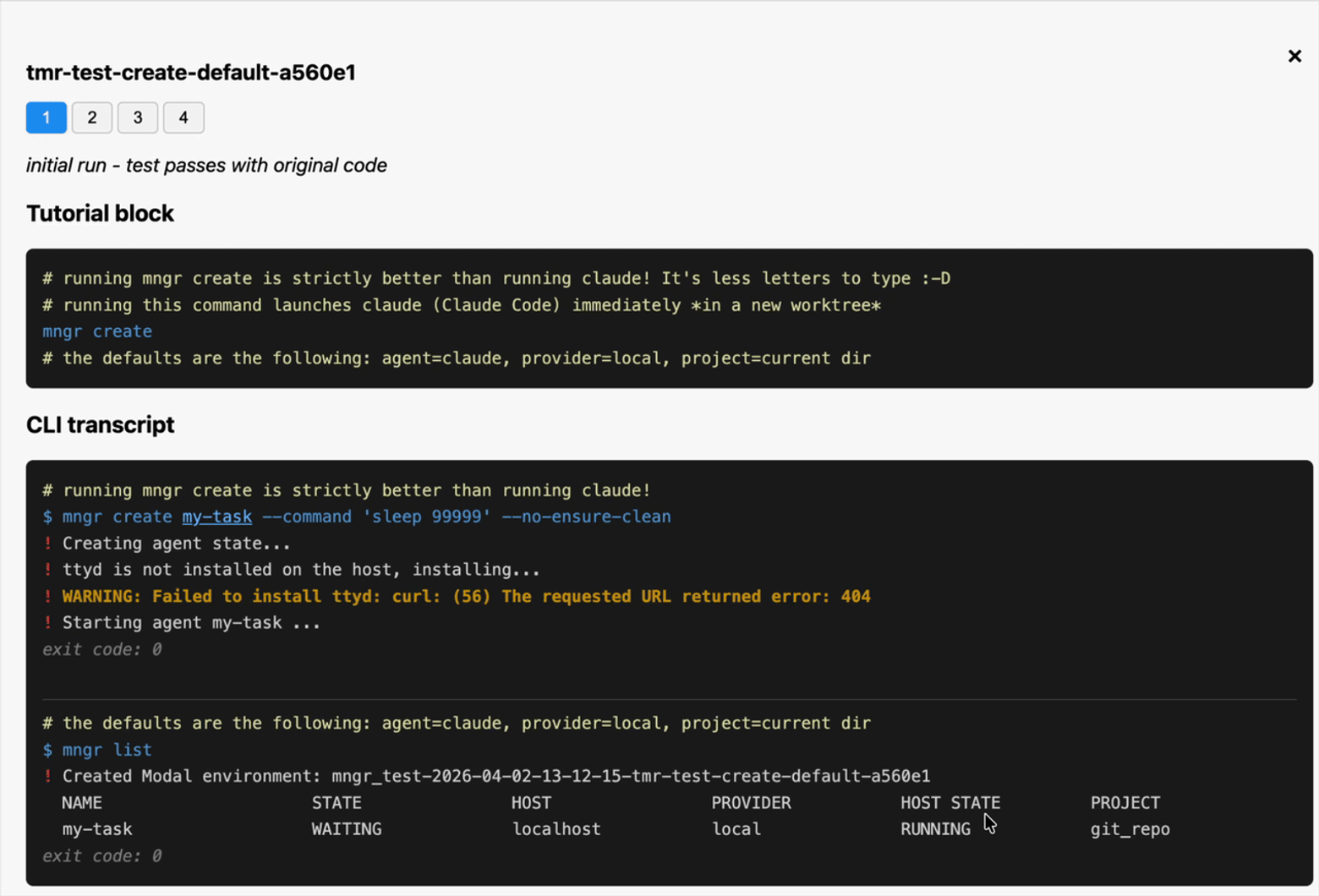
pythonBuilding this extra layer also allows us to generate transcripts for the commands, which looks like:
shFinally, remember that mngr runs your agent in a tmux session, and tmux can’t be so easily captured as simple CLI transcripts. But fear not: mngr allows us to define a custom “connect command”, and in our test setup, we redirect it to a script by writing the following config:
tomlThe mngr-e2e-connect script, in turn, uses asciinema to attach to the agent, and saves the recording in the test output directory.
We also built a combined view of all the artifacts–you can see the CLI transcript and TUI recordings on a web page:
Orchestrating the tests
Now that we have all those tests, let’s run them! Here’s the plan:
- Collect all the test names using
pytest --collect-only - For each test, launch an agent to work on it. This means several things:a. If the test is failing, either fix the test code or the code it’s testingb. If the test is passing, think about how to improve the test itself: make it more faithful to the original tutorial block, make the assertions more realistic, create additional tests etc.c. In any case, we instruct the agent to write a result JSON file.
- Wait for them to finish, pulling their result JSON files and test artifacts.
- Collect all the code changes they made, and use an agent to merge them all together into one mega PR.
Aside from step 1, every other step is implemented using mngr’s primitives:
- Use the
mngr createprimitive to launch testing agents, which also allows us to send an initial prompt. - Use the
mngr listprimitive to poll the state of the agents. - When an agent is done, use the
mngr pullprimitive to pull down the result files and test artifacts, and then themngr stopprimitive to stop it. - Finally, use the
mngr createprimitive again to create the “integrator” agent that merges all the changes together.
Integrating changes from all the agents
Integrating changes from many agents is not a trivial task, even for an agent. We spent a lot of time thinking about and iterating on this, and this is eventually what we ended up with:
- Each of the testing agents would divide its commits into implementation fixes, and non-implementation (fixing the test or just making it better, fixing some doc, etc.)
- When the integrator sees the results from all the testing agents, it just merges all the non-implementation fixes together - since these are usually uncontroversial.
- For all the implementation fixes, we instruct the integrator to rank them by importance, and keep them as distinct commits, but merge them into a single linear branch, resolving conflicts along the way.
This results in a single PR that can be easily reviewed by a human: the non-implementation fixes usually can be merged as is, and the implementation fixes can be reviewed one by one, with undesirable ones reverted.
Another thing worth mentioning is that not all testing agents produce changes that can get integrated. Some testing agents just get confused, or can’t make progress unless something in the environment is fixed. We instruct the testing agents to reproduce a “blocked” outcome in that case, and simply put that in the report we generate.
How I developed the orchestration workflow
When I started building this workflow, I built the entire lifecycle using only agents on my local machine. This allows me to iterate super quickly, because the agents start up immediately, and if I want to peek into an agent, it’s just an instant tmux attach command away.
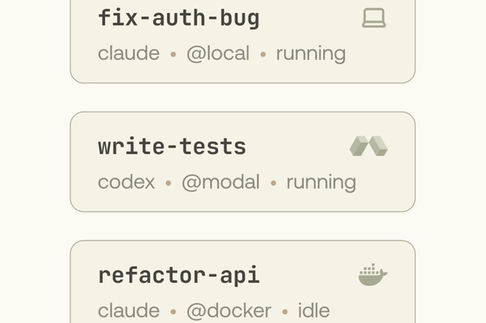
Eventually I’m happy with this workflow for running 10 agents, and I want to scale up to 100 agents. My local machine is not strong enough for that, and it’s time to deploy those agents remotely. To do that, I simply change one thing in how I use mngr create: from mngr create foo to mngr create foo@.modal and voila! All my agents now run on Modal instead. And the subsequent interactions with the agents remain the same: mngr list, mngr pull and mngr stop all work the same between local and remote Modal agents, because mngr abstracts away the differences between them.
I lied a bit actually. When I started, I was using the Git worktree mode to create working copies for my local agents; merging their changes together is very easy, since they are already available as branches in my original Git repo. But Git worktrees don’t work on remote agents—they use the Git mirror mode.
But fear not: I can also simply request mngr to also use the Git mirror mode when creating the local agent. Git worktree is the default for local agents, but you’re in no way locked into it. Now we’re exercising roughly the same code path as with remote agents, and we should now use mngr pull to explicitly pull the changes into my original git repo before merging the changes there. Now the workflow is really the same between local and remote.
Software composability
Let’s take a step back and think about what we built. What we have built is essentially a small map reduce pipeline:
- Gather a list of tests
- Map them over an agent per test
- Reduce the results together into a single branch
What is remarkable is that mngr itself doesn’t know anything about map reduce: we built the pipeline, but each step uses a primitive that mngr provides. Unlike other multi-agent workflow tools that try to give you the “map reduce framework”, mngr gives you the “maps” and “reduces”, just like a library of functional programming primitives, so that you can build whatever simple or complex multi-agent pipeline you want.
Software scalability
Let’s also think about how I built the pipeline. The “end product” runs on hundreds of Modal sandboxes, but I started out by running everything on my local machine. In other words, I started small and mngr allowed me to scale up smoothlessly.
But what is also remarkable—and this is a property that is often overlooked—is that I can always easily scale down back into my local machine. Sure, I can’t easily run hundreds of agents on my machine because we are in the middle of a global RAM shortage, but I can always run 10 of them in parallel, and by trading space for time, I can run hundreds of agents overnight.
When we talk about software scalability, we often focus on two things: the ability to scale up, and the incremental cost to do so. But we don’t talk nearly enough about the ability to scale down, and the upfront cost you have to pay.
In the world of increasingly large tech conglomerates with highly specialized infrastructure teams and billions of users, being only able to scale up and paying a lot of cost upfront is not a bad tradeoff. But for small teams, being able to get started quickly and easily and locally–without the big up-front investment–is often much more valuable. When doing so with mngr, it’s still easy to scale up later if you want to.
mngr is engineered to be truly scalable: the incremental cost is low, as is the upfront cost. It is an ergonomic CLI for managing a few local “pet agents,” but you can also just ask it to run 100 agents on Modal.
The future of software development
We’re really happy that we’ve been able to leverage mngr to make itself better, but this is just the beginning.
Imbue’s mission is to make tech serve humans, and the way we are building mngr is consistent with that mission. Multi-agent workflows—whether it’s running a few coding agents locally, or launching hundreds of them remotely—are quickly becoming the key to fully harnessing the power of AI-assisted software engineering.
Instead of locking you to a specific platform, mngr gives you primitives that you can use locally or remotely, works at tiny scales and large scales alike, giving you all the freedom to build the workflows that suit your personal or business needs.
mngr is free, open source, and available here. Try it out and let us know what you think on X or Product Hunt.