Usefully run hundreds of Claudes in parallel with mngr
- Massively parallel testing: theory vs. practice
- Why this is so cool
- 1. Automatic starting and stopping of sandboxes
- 2. Easily inspect, debug, and communicate with individual agents
- 3. Model/harness/provider agnostic
- 4. Easy-to-review result aggregation
- 5. Free and open source
- Where to go from here
- Try it out today
- Footnotes
Today we’re launching mngr, a command-line tool that makes it easy to build robust workflows on top of AI agents without being locked into a single provider. View it on GitHub here. mngr runs fully locally, and lets you run any agent you want (Claude, Codex, etc.) on any compute platform (localhost, Docker, Modal, or anything that you can SSH into), and gives you a powerful set of primitives to build your own systems out of agents.
The easiest way to understand the power of mngr is to see the types of workflows it enables. It makes it easy to use many agents in parallel to do things like:
- Review each file in your code base and fix any issues
- Scan your entire code base for a single type of issue and fix all instances
- Create PRs for every open GitHub issue
Let’s say that you wanted to do the following:
“Create tests for the 100’s of examples of using mngr across all of our tutorials”In this blog post (Part 1), we’ll show how you can run agents to create all of those tests in parallel and finish the whole task in a single afternoon by using mngr. Part 2 provides more details on the actual testing itself.
Massively parallel testing: theory vs. practice
In theory, if you want to create tests for all the commands displayed in your tutorials, all you need to do to is tell your magical AGI:
“claude -p “Make all the tutorial commands work””
Unfortunately, if you have hundreds of tutorial commands, that won’t work in practice:
- If the agent does the tasks sequentially, it’s going to take a really long time and be really expensive (due to its huge context use)
- If the agent does all the tasks at once in parallel subagents, your computer will grind to a halt (after the fan maxes out for a bit)
- If the agent tries to do sensibly-sized batches of tasks, you’ll have to sit there coaxing it along
- Reviewing the resulting massive PR will be a huge headache with all the new tests, bug fixes, and doc fixes mixed together into one massive commit
- If anything goes wrong with a subagent, it will be hard to debug what failed and why
- It will be difficult to check if any of the examples were missed
In theory, what you really want is something like this instead:
shIdeally that command would:
- Create a separate sandbox for each agent (and pause when it’s done)
- Be trivial to inspect and debug
- Work with any agent/harness/model provider
- Sensibly aggregate all of the results
- Be free and open source
This is exactly the kind of thing that mngr enables, and you can get all of the above in practice today:
shIt’s not exactly the world’s prettiest bash 1-liner, but it works! In Part 2, we go over a more advanced version.
Why this is so cool
You can literally copy-paste that command and have it run for yourself, in your own repo, today, for free (except for the cost of inference and the sandboxes).
This command has all the properties you want for running parallel agents in practice:
1. Automatic starting and stopping of sandboxes
mngr makes you “host agnostic”. It doesn’t matter whether you run locally, in docker, or in a remote Modal Sandbox–everything Just WorksTM, including:
- Shutting down remote sandboxes once their agents become idle
- Snapshotting the sandbox before it shuts down
- Automatically resuming from that state later when you connect to continue the conversation or debug
- Getting the data and configuration in and out (even when the agent is offline!)
- Reliably messaging all the running agents and viewing their transcripts
Because of this, you can change --provider modal to --provider local or --provider docker in the above gross bash command and it will Just WorkTM [1]
2. Easily inspect, debug, and communicate with individual agents
When you run 100 agents in parallel, you often end up wanting to connect to some of them (especially if some of them fail or get stuck). mngr makes it just as easy to do that remotely and at scale as it would be when running locally.
That’s because mngr is ridiculously simple under the hood. It’s just running an agent (e.g. claude) in a tmux session:

Even when an agent is remote, you can run mngr connect in order to see exactly what it’s doing.
It’s hard to overstate how easy this makes debugging, especially when the agents are remote. Try it out!
mngr also comes with a bunch of other handy debugging and introspection tools, including:
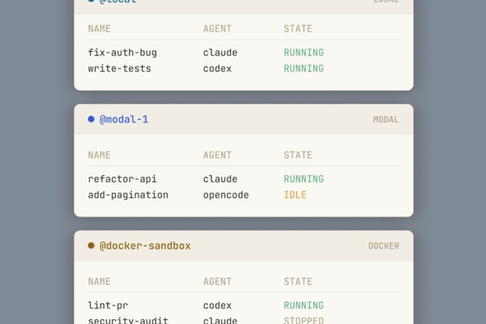
mngr listto see the status of all running agents, including whether they are blocked on youmngr transcriptto see the literal history of messages from the agentmngr fileto browse the filesystem of the agent, even after it is offline (yes, really)mngr captureto take a “screenshot” of the current session, in case it is stuck
See the docs for even more.
3. Model/harness/provider agnostic
mngr works with not just any AI coding agent, it works with any Unix process. Because “agents” are simply “a process running in a tmux session”, you can just as easily run Claude Code, Codex, or even an nginx webserver as an “agent” [2].
Change claude to codex in the above parallel testing command and it should Just WorkTM
We normally use Claude Code, so that support is well-tested, including proper isolation of settings and state files when running many instances of Claude Code on the same host, but most other agents should work fairly well. If you run into issues, simply make a GitHub issue and we’ll happily have Claude fix it.
4. Easy-to-review result aggregation
When you’re actually running hundreds of agents, you really don’t want to be looking at hundreds of resulting PRs. You need to think carefully about how you want to aggregate the resulting changes to make them as easy to review as possible.
mngr provides all the tools to make aggregation easy:
- Easily authenticate with GitHub in the remote containers
- Access files even when remote hosts are offline
- Manually intervene for exceptional cases
The specific aggregation that you want will vary by task and by project. For this particular example—testing out tutorial examples—you would probably want a few different types of outputs (new tests, doc cleanups, bug fixes, etc.) each of which you might want to review in a different way.
We go into much more detail on this part of the flow in Part 2.
5. Free and open source
In 2026, it’s crazy to build on top of software that isn’t open source [3]
There are just too many advantages to open source for it to be worth using anything else:
- It’s free
- You’re never locked in
- It will never upgrade underneath you and remove features you like
- It won’t go out of business and disappear when it runs out of VC money
- Other people can contribute to it and make it better with you
- Most importantly: if it’s ever missing a feature you want, you’re only ~1 prompt away from having that feature
Seriously. Stop using weird closed source “services” for stupid simple shit that you can do with tmux, ssh, and other ultra-robust tools that have been around for decades.
Where to go from here
This post gives an example of how to write hundreds of tests in parallel, but that’s just one tiny example of what you can do with mngr. You can use it to run many agents in parallel for whatever you want!
And mngr isn’t just for running lots of agents. There are actually lots of good reasons to use it as your daily driver, even if you’re just running a few agents:
- It’s strictly better than running Claude Code. It automatically creates a new worktree, git branch and tmux session for a new agent.
mngrruns just as fast, and can be migrated to any remote host. - It’s trivial to run in a container. Just add
--provider dockerand it will create a Docker container for your agent. You can easily stick multiple agents into the same shared Docker container, or stick them each in their own container. - There’s a nice TUI plugin (mngr_kanpan). Check it out if you want a simple, configurable overview of all your currently running agents where you can easily interact with them with a single keystroke.
- It’s super easy to learn. The built-in
mngr askcommand means that you can ask it how to use itself to do basically anything. Or read through the extensive docs yourself.
Try it out today
mngr is completely free software (MIT license), and you can install it today:
curl -fsSL https://raw.githubusercontent.com/imbue-ai/mngr/main/scripts/install.sh | bash
If you’re excited for a world where the tools we build are open, local, personal, robust, and transparent, give mngr a star on GitHub!
Footnotes
[1] If you’re running that command locally it will use git worktrees instead. It should work (assuming you have a big enough computer), or you can turn down the parallelism
[2] Obviously some programs are more agents than others, and mngr is primarily intended to be used with AI agent style programs (e.g. programs that have notions of “messages” and “transcripts”), but it’s handy that you can run other processes via the same framework (ex: for one-off tasks on the same infrastructure).
[3] Unfortunately LLM providers are an exception; it’d be better for open source models to be at the same caliber, and we want to encourage that to happen over the next few years, but they’re not quite there yet. Claude Code gets a special pass for now because the source code is available now anyway (lol), and we’ll likely move to a different harness at some point this year for the reasons mentioned above.